- Add Metadata mapping for column you want to add to refine Panel:
- Go to Fast Query Service and Select Manage from Control Panel.
- From Left navigation, select Fast Search Administration.
- Select Link Manage Properties to manage properties mapping between your metadata and crawled content.
- You can add or manage property. To allow property to be used for refine panel make sure refiner property is checked.
- To Add a metadata to Refine Panel:
- From Search Page Edit Refine Panel Web part.
- Form Filter category definition you add/remove columns.
- Make sure use default configuration is unchecked to allow you customize column
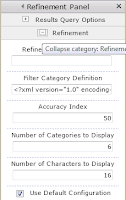
- Make sure use default
configuration is unchecked to allow you customize column.
Showing posts with label Refine Panel. Show all posts
Showing posts with label Refine Panel. Show all posts
Saturday, December 22, 2012
To Customize Refine Panel in UI Web Part


Subscribe to:
Posts (Atom)